This lesson describes the software interface used when it was written.
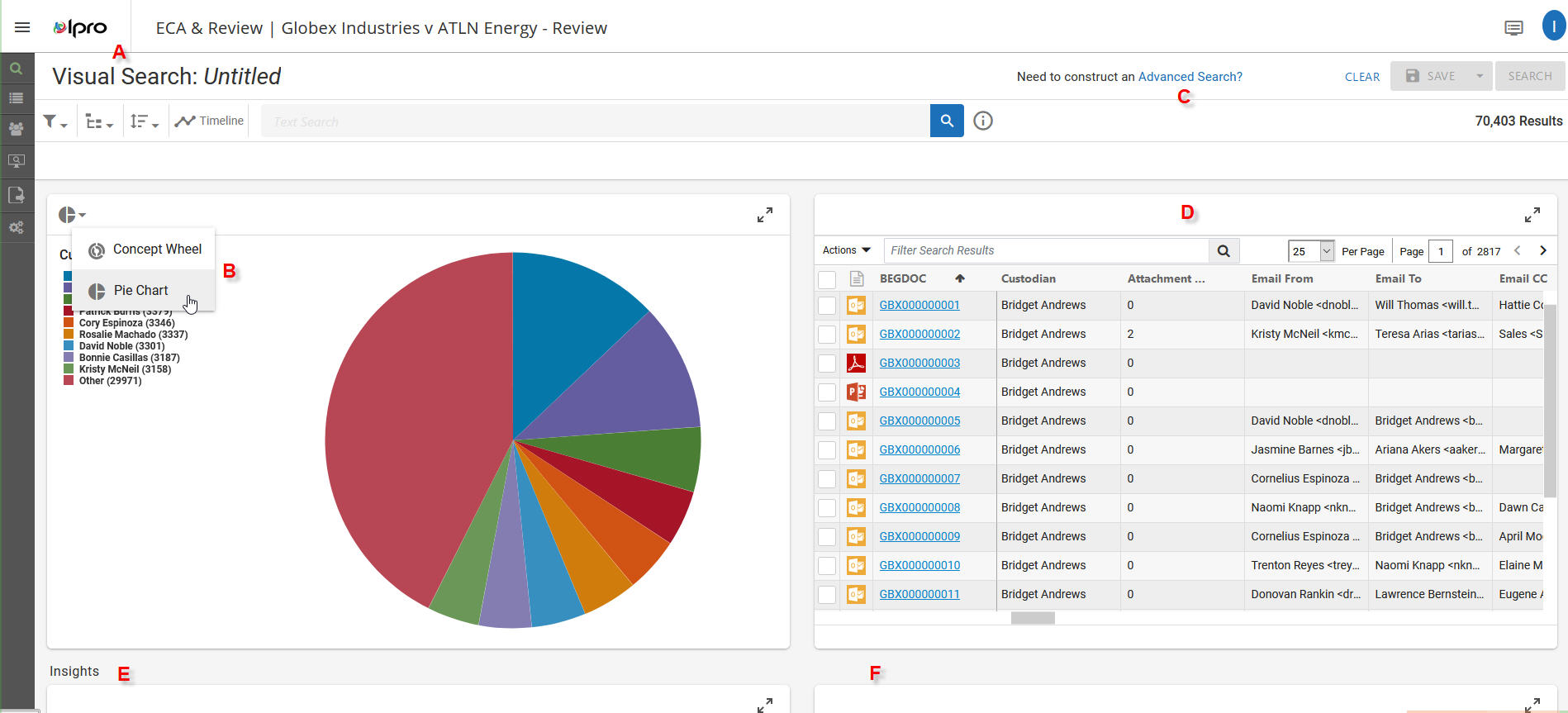
July 1st, 2020 Ipro released a new version for Ipro for Enterprise (IFE), v. 2020.8.0. I wouldn't normally announce new versions here, however, while some welcome changes were made, they also changed the view of what you will see once you arrive at your case data for review. Surprise! If you've worked in any other version up until this upgrade, you can rely on my LN #1. If you have upgraded (or are about to) to this version, here's a mini-guide to what's where:
- You used to see options/tabs for Visual Search (now A), Advanced Search (now C) and Results (now D). Your standard view is now a split-screen between Visual Search (A) and Results (i.e., database records) (D).
- The Visual Search (A) portion of this screen has quick views for the Pie Chart (B) (which is customizable) or the Concept Wheel (B) (understanding the index for this feature has to have been run).
- The workflow for using this feature has changed. As you identify elements with which you want to search for, those elements appear in the title bar, as either an OR or AND search, depending or your choice options.
- The workflow for using this feature has changed. As you identify elements with which you want to search for, those elements appear in the title bar, as either an OR or AND search, depending or your choice options.
- If you want to view the Advanced Search options, select (C). This changes the view with tabs for Advanced Search and Results. This workflow should look exactly the same as previous releases.
- Below these important review elements are Insights (E and F). By default, you should see a bar chart for Custodian; a grid for Email Domains; and below those two sections, a Search Reports section.