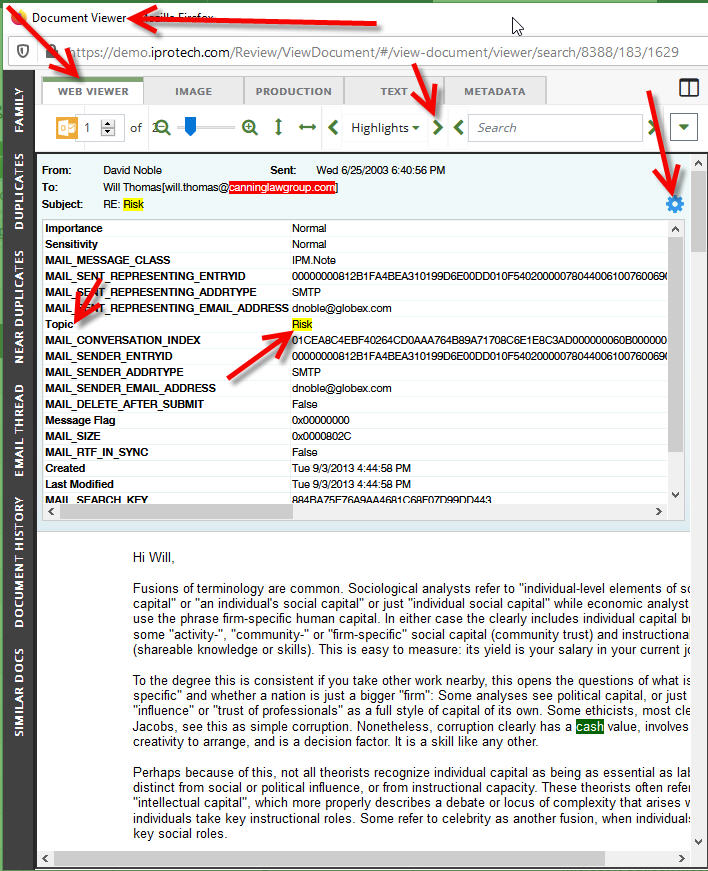
This lesson describes the software interface used when it was written.
Full text Quick Searching is a fairly simple process in Ipro for Enterprise (IFE), for sure. We have our Boolean operators, (and, or, not). We've got proximity searching tools, (w/#, pre/#), as well as wildcards, (*, ?, =). But how do we effectively review the results?
When viewing the hit highlights in the Document Viewer, what steps can we take to ensure we're reviewing everything we can, based on that search? As long as we don't have persistent highlights activated, if we click on the forward arrow to the right of Highlights, IFE allows us to review the hits highlighted, word by word. When in the Web Viewer, we get an added bonus. IFE also shows us highlighted hits in the metadata!
If you look to the right, you see a little gear icon. You only see it if there are hits found in the metadata. If you click on the gear, a metadata panel opens above the text of the document. The forward/right arrows will advance to each hit in the metadata. This is a wonderful feature, especially when the word(s) are not in the text of the document and only in the metadata. It's a wonderful review timesaver!